
Most strike systems are a simple “number that goes up” one. Three strikes for warning, five strikes for timeout, seven strikes for ban. Configurability vary, but none are enough.
What is a strike system?
For those who are not familiar with it, a strike system is a way to let your bot automatically perform increasingly punishing actions on a user based on how many strikes they have already gotten.
Staff just have to categorize the violation, and the system is pre-configured to know exactly how to respond to it.
It makes moderating members predictable, unopinionated by the staff member issuing the strike, history-aware, and semi-automated.
Our building blocks
So, what makes Archivian different than other bots strike systems?
Most other bots have different levels of rigidity, and the exact part that is rigid depend on the bot:
- how to treat users who already reached max strikes; most assume you choose ban, and never unban
- how strikes are counted; most are “points go up”
- how strikes expire; most are “expire after date”
- what actions a strike can perform; most are just alert/warn/timeout/kick/ban
- how many “thresholds” there are; fixed ranges 1-5 strikes or 0% to 100%
- what a strike is worth; a strike is always 1 point or fixed percentage
- and the list goes on…
Archivian is made up from some basic building blocks. Each one has its own set of configurability.
- Pools let you run multiple independent strike systems simultaneously.
- Sources are things that can issue strikes.
/strikecommand is one, but you can also automate them, and make pre-made strike reasons. - Strike Points is the currency; a strike gives an arbitrary amount of points you decide on.
- Action Ladder is a sequential set of thresholds within a pool; you choose the thresholds. These are Action rungs.
- Action Rungs is a threshold that can be met, and configured to perform various actions when crossed.
↑ Some of these limits are indirectly imposed due to limitations within Discord, but may be expanded.
Pools for scoping and multi-lane strike systems
Strike Pools essentially lets your run multiple strike independent strike systems at once. They do not interfere with each other, they don’t know about each other at all.
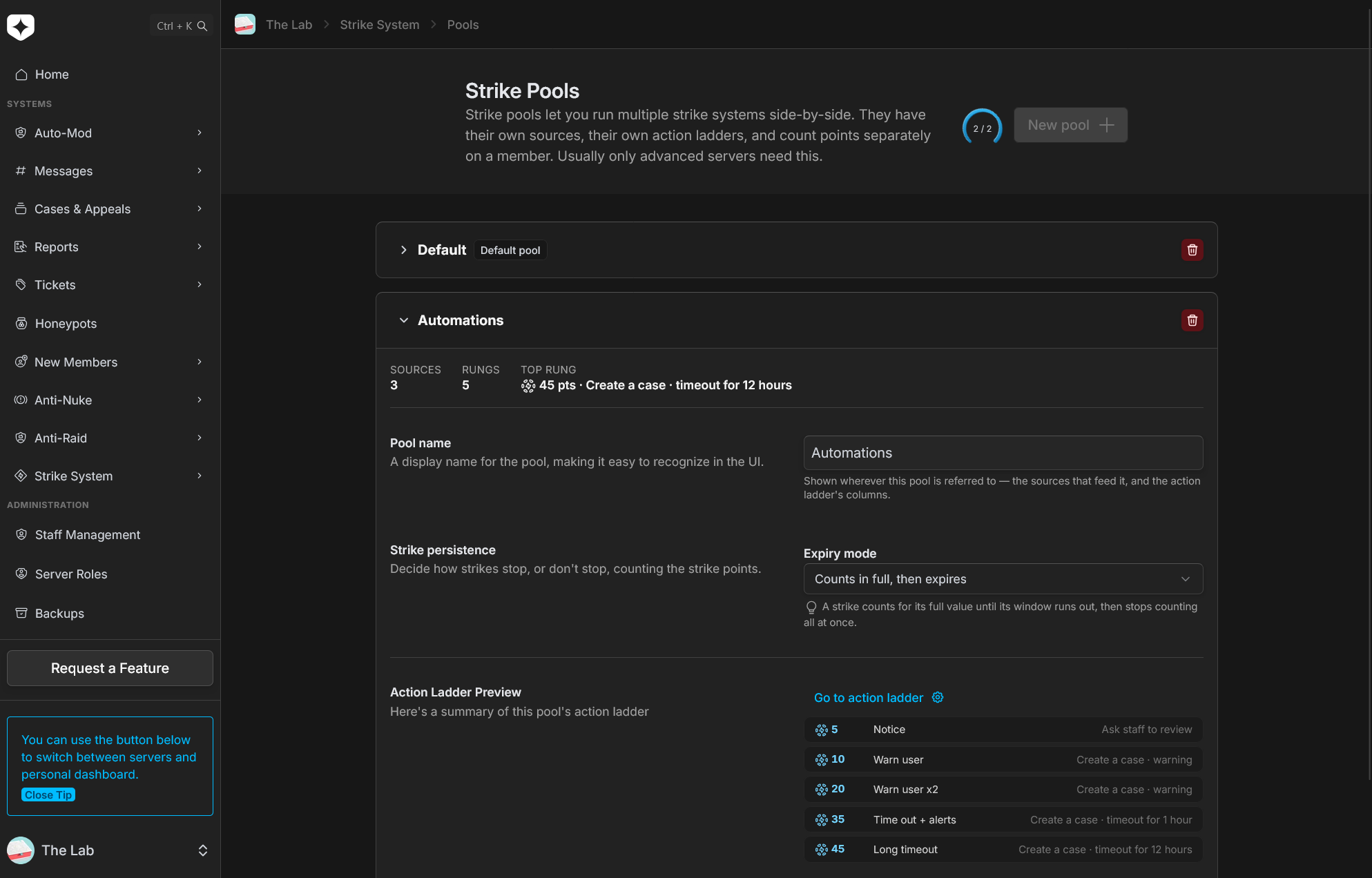
There are only a few global settings that apply to all strike pools, but these are mostly logical decisions that you likely would want to apply to all of them anyway. The important distinctions are made on a lower level, where they are isolated by pools.
You can, for example, have one lane for automated strike sources and another for manual ones. Each pool has a strike ladder, so you can configure different thresholds and actions.
This can let automated strikes still perform independent actions that may not be as severe, without forcing manual strikes to operate with the same low-level thresholds and actions.
It can also be used to isolate jurisdictions if you have a larger server with different responsibilities for different teams.
In the future, these strike pools will have the ability to be permission-bound. This will allow trial staff to operate with low-stakes pools, full staff with a higher stakes pool, and all automations to work in a third middle-ground pool. If you are interested in permission-based pool scoping and management, please let us know by creating a feature request.
Sources, to control strike ingest
Strike Sources are all the possible ways a strike can be issued.
By default, that is your /strike command and context-menu options on messages and users to create a strike.
On top of these, you can create pre-made reasons for these manual strikes. These are also a kind of strike source.
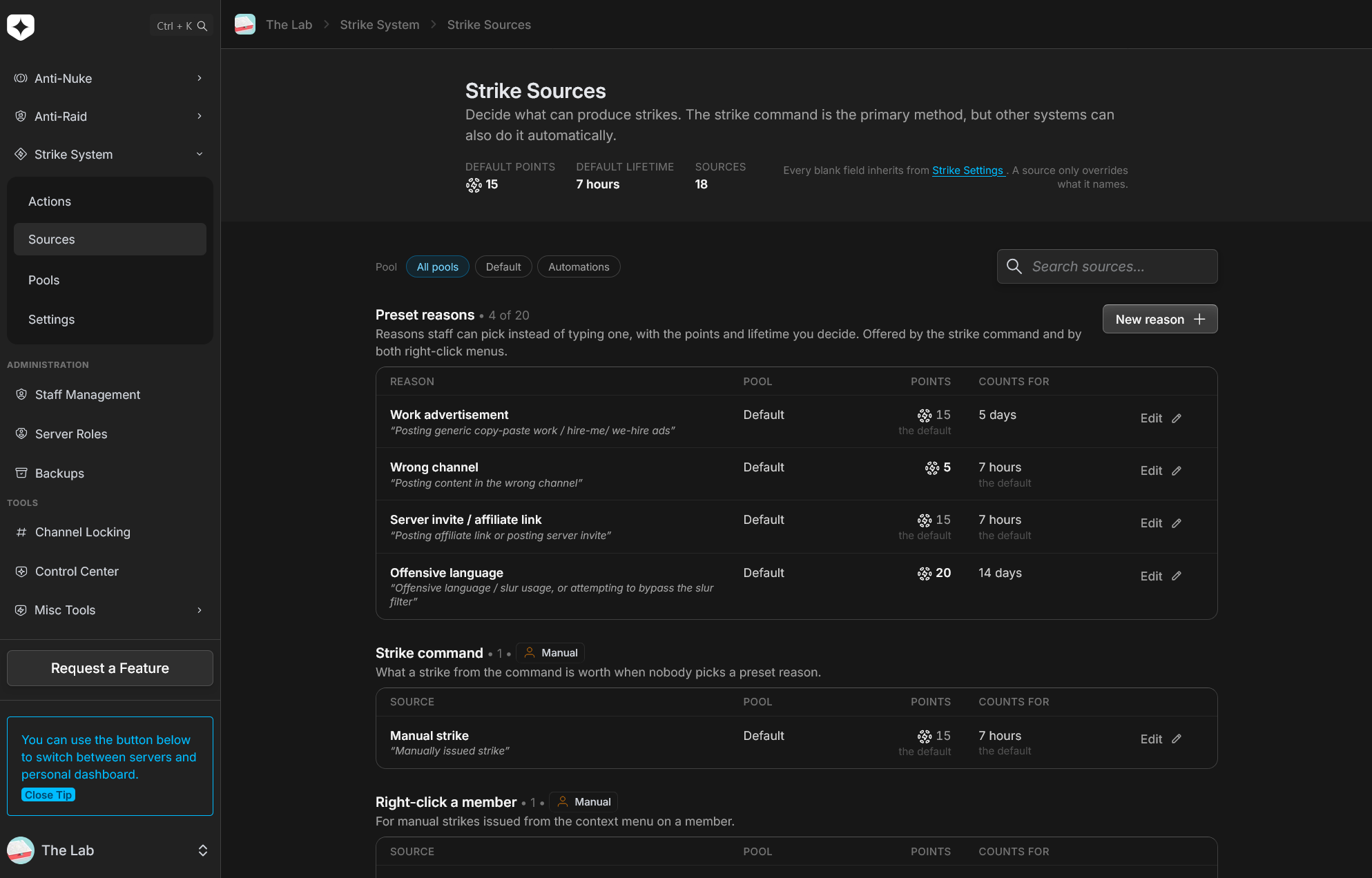
You can give the strike a display-name for staff, and a pre-made reasons for the strike that is given to the user. The pre-made reason is a way to save time having to type the full reason, and also stay consistent.
Each strike simply inherits the global defaults for the strike system, which is the amount of points a strike normally gives, and how long it lasts for. This gives you the fidelity needed to create separate severities, because depending on the severity, you give more or less points, in a strike that lasts longer or shorter than usual.
Automated strikes lets it feed itself
Then there are automated strike systems, which issue strikes without any manual intervention at all. A perfect example of this are the Discord Auto-Mod rules. You can set it up so that violating a specific Discord Auto-Mod rule issues a specific kind of strike.
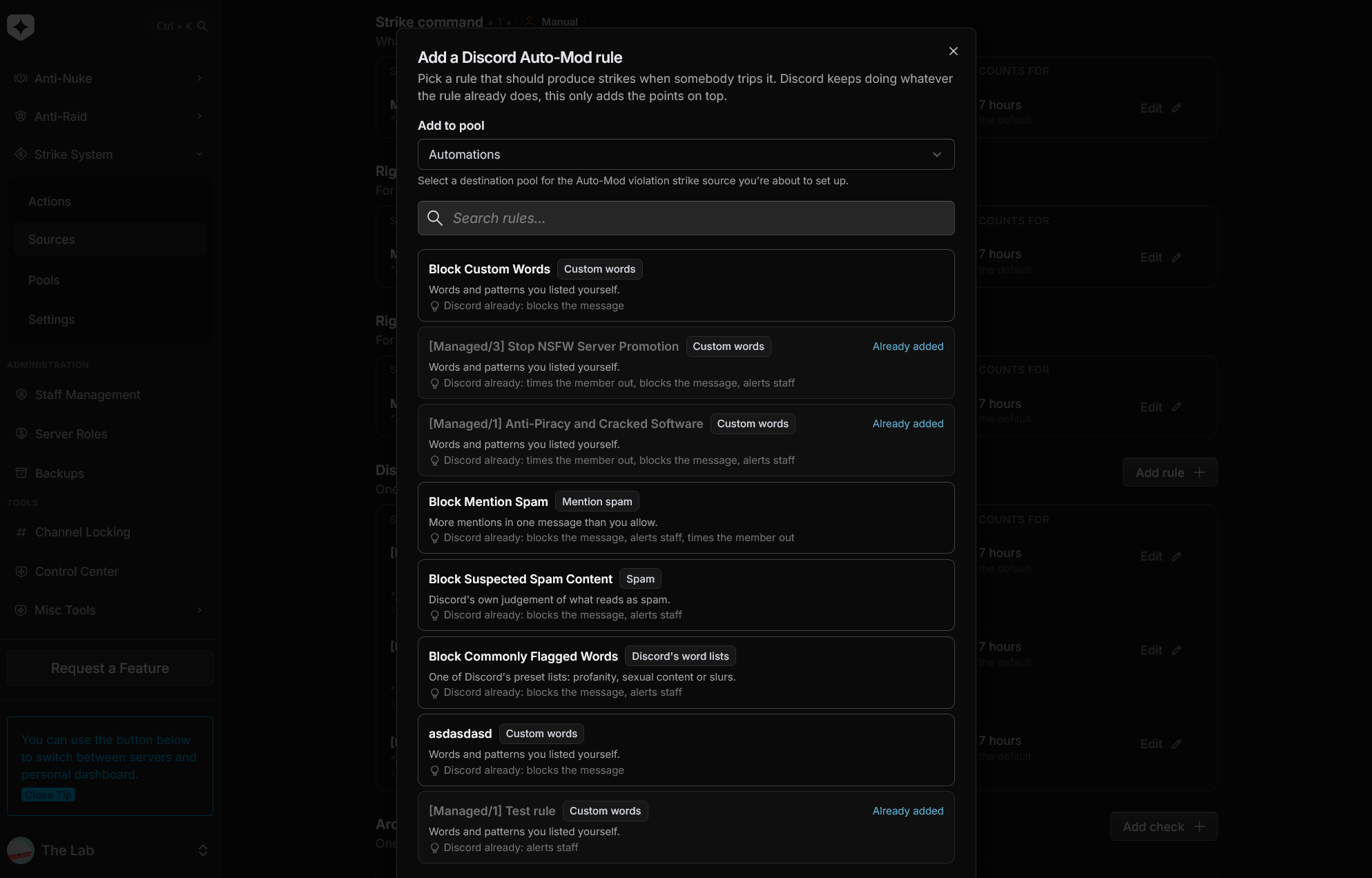
The same is also afforded to Archivian’s own Auto-Mod system, so you can tie strikes to different types of Auto-Mod checks Archivian does.
Pick the rules that should count
Archivian lists every Auto-Mod rule in your server, each showing what kind of rule it is and what Discord already does when it trips.
Set what it is worth
Points, lifetime, and which pool it feeds, configured exactly like a preset reason. A rule can feed several pools at once if you want it counted in more than one place.
Leave it alone
Violations start costing points immediately. Renaming the rule in Discord keeps the source in step; deleting it leaves the source visible and marked, rather than quietly discarding the points and lifetime you configured.
Points, so severity becomes a factor
Every strike adds points to a member’s running total, within a pool.
Depending on your server, not all strikes are equal. A minor offence might be worth 5, and a serious one 40.
Archivian lets you always configure how many points a given strike adds, and the action rungs have configurable point thresholds. This level of control lets you set up a nice system where severity has a proper impact.
The total points is what the ladder watches, which means the system can tell the difference between somebody who has been mildly annoying six times and somebody who did one genuinely bad thing.
There’s a global default for how many points a strike with no override gives, but you can provide an override whenever you issue a strike command manually, or in the strike source for pre-made reasons and automated sources.
Preset Reasons, pre-configured severity
Preset reasons are likely going to be your bread and butter, and is how that stays consistent.
Ahead of time, staff agrees on a set of possible offences and how severe they are by assigning points to a strike reason.
For example, define “Spamming in general chat” once; its wording, its points, how long it counts. Then, every moderator issuing it issues the same thing. Five moderators with five ideas of what spam is worth becomes one answer, and staff can still write a custom reason for anything that does not fit.
Action Ladders, materializing the strike pool
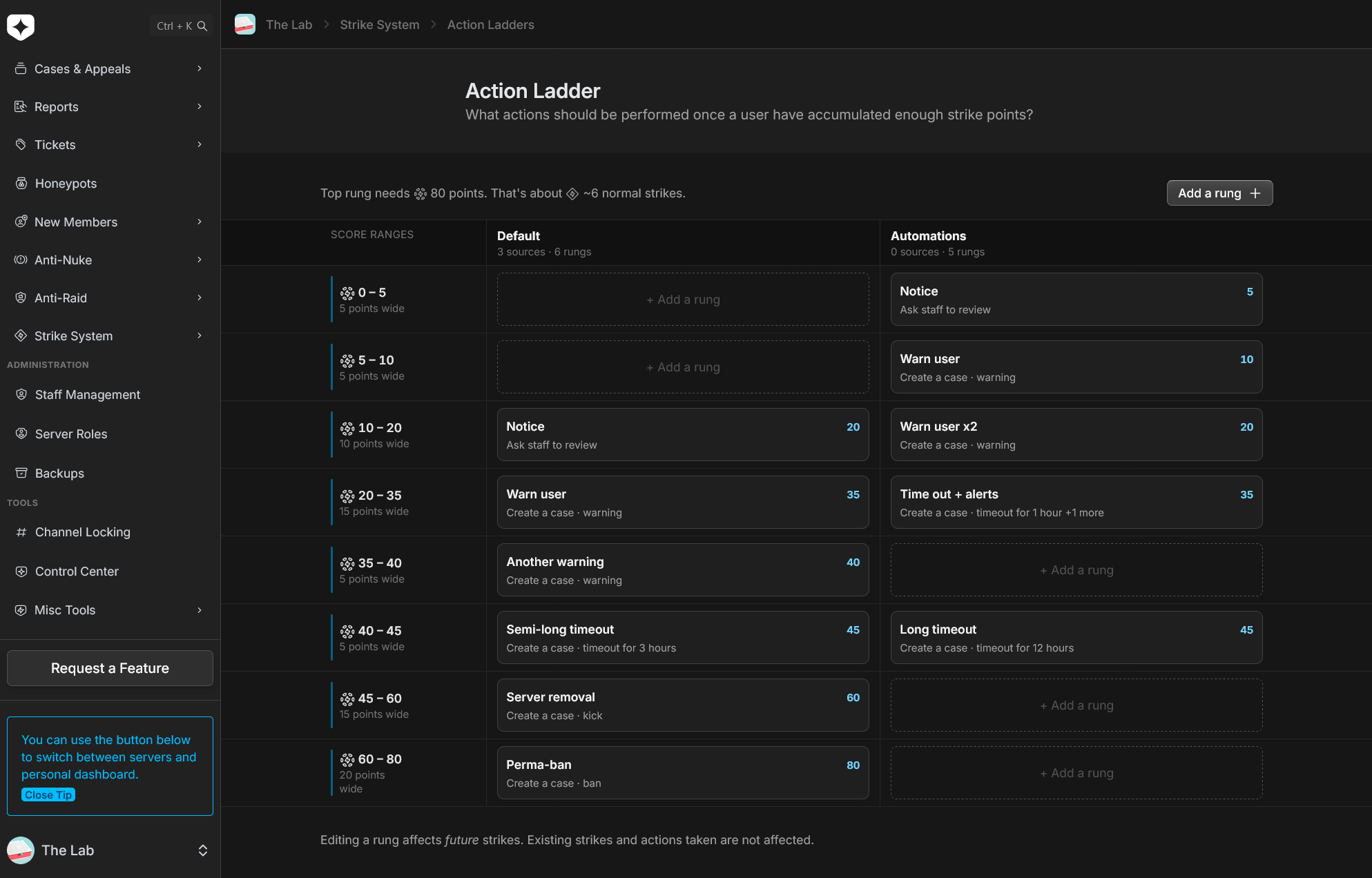
An Strike Action Ladder is the container a pool operates in when checking if we should do something about the user. You can think of a pool and a ladder as one unit.
A ladder is a way of referring to the path a user can go down, what thresholds (rungs) they can find a long the way, and what actions those rungs may take on them.
Action Rungs, the Judge & Executioner
Inside an action ladder, you set up Action Rungs. You can create up to 25 rungs, which is usually more than enough for dealing with repeat offenders. An action ladder appears at configurable thresholds. If you want a simple 0% to 100% strike system, simply set up some action ladders that require between 1 and 100 points.
If you have many granular strikes, ranging from 1 point to 100 points, you can simply make your rungs have thresholds upwards of 1000 strike points. The choice is yours.
For each rung, you also set up the actions to be executed whenever this rung is met. We don’t limit you to only creating cases, and the actions possible within an action ladder will expand with time.
At the time of writing, it has a solid baseline of actions that should more than cover what other bots can already do:
- create a case; note, warning, timeout, kick, temp-ban, permanent ban
- create an alert for staff
- send custom messages in a specific channel or in DMs to the user
- add roles to the user
- remove roles from the user; or remove all roles they have
You can enable one, or all of the actions. We simply offer the possibilities, and you choose how it should go down.
Passing vs. landing on a threshold
There is also some diverging behavior between bots on whether a threshold runs actions or not depending on whether it simply passed the threshold, or if it actually landed on the threshold. That’s to say, a user going from 0 to 100 points in a single strike, what does the threshold at 40 points do when we also have a threshold at 80?
Some bots execute all that you pass, others only the highest one you land on.
Archivian is one of the few that lets you choose what behavior to follow—and one of the even fewer that lets you choose this per rung.
Hysteresis, a latch systems for expiring points
Each action rung also has configuration for not firing the actions.
This becomes important when you have a user that was punished for being a few points above a threshold, then a minor offence expires, and then they get another minor offence. Should they be punished the same way again immediately? This is what the hysteresis system and cooldown system lets you answer.
You can simply say that they need to dip below a certain amount of points before the action can fire again, and that a certain amount of time must also have passed.
Explicit top-of-ladder handling, so you aren’t left wondering
How bots deal with members that have maxed out the strike punishments, but in some way but are still in the server, varies. In most bots, this is a surprise left for you to figure out whenever you have an unexplainable behavior after further strikes.
The default option when you reach the top of the strike punishments is usually to ban the user—but what if that’s not the case? And what if they appealed and got unbanned? What then?
Archivian address this specific scenario explicitly through a global configuration, so there are no surprises. When a user reaches the end of the strike ladder, you can choose what it does with the user’s points, making future strikes predictable.
We have several options for manipulating the points whenever they reach the ladder top;
- clear points
- reduce by amount
- reduce by percentage
- reduce by dynamic amount
And, as a bonus, you can add permanent strike points when reaching the end, so that in case you clear or reduce points, they never really start from scratch. Clearing points never affect permanent strike points. Leveraging this, you can make the fuse shorter and shorter for every time they max out the ladder—rightfully so.
Powerful point expiry controls
As mentioned, not all strikes are equal. Some are more serious, some less so. Archivian acknowledges this, not only by having pools and configurable rungs based on points, but also by having two additional options for expiry:
- override the expiry date, or
- simply making the strike permanent
Permanent strike points
Permanent strike points are not exclusive to the top-of-ladder handling, they can be assigned like any other points.
A serious strike can be made to stain your record much longer than usual. Perhaps even indefinitely is the answer. Whenever you configure a strike source, you can choose to use the server default expiry, or set a shorter or longer one for this particular strike.
The difference between a permanent strike and an in-the-far-far-future strike is subtle, but matter for the top-of-ladder handling. The permanent points are not touched at all, whereas a far-far-in-the-future strike is marked as no longer counting. You can leverage this difference in behavior to have even more custom behavior.
Points decay
Again, this is another aspects where bots differ. Some may have permanent points only, others have individual points that expire, or that your points decay over time. Archivian lets you choose which one you want to use.
The hard expiry once a strike is old enough is a tried-and-true method, and is easy to reason about. But it can also make a user’s points stay right at the edge for a long time. Maybe that’s something you want, or maybe you want a more chill community.
The decay more lets you have points decay over time. The best part is that this decay rate is extremely flexible. Normally this is where you would find a fixed value like “4 points per hour”, or a ladder system like “N points after X days, M points after Y days” where you have to add the steps yourself. We opted for a configurable curve so you can skip the cumbersome addition and tweaking of steps, and still be able to do something like “X points per minute”.
The curve editor
This easing curve is configurable visually, and instantly creates a ladder for you with infinite precision. Maybe it looks daunting to some, but the logic is simple; a strike worth 100 points at creation is worth less after some amount of time. The Y axis is how much of the original points count, X axis is how long the strike is lasting. The example is based on your server’s default, but is independent per strike.
- presets show you example that you can use as-is or modify
- a box on the bottom shows example timestamps and how much points would count at that time
- the curve editor is simple, giving instant feedback by simply moving two handles around
Pardoning system
Pardoning is an easy way to undo a strike that was issue. It is pretty straight-forward, you just use /strikes pardon <user> <the strike> <reason>.
That specific strike is kept in the records, but stops counting.
You can just as easily un-pardon it, so that it starts counting again. Useful if you picked the wrong string: /strikes unpardon <user> <the strike>.
Why it matters
A flat strike counter offloads every real decision onto whoever is online. Points, a ladder that fires itself, and separate pools move those decisions to where they belong: made once, deliberately, by the people setting policy—then, applied identically any time of day, to everybody, whether a moderator was watching or an Auto-Mod rule caught it.
With a flexible enough strike system and the right setup, you could potentially simplify the majority of moderation down to simply issuing a strike with the right categorization. The rest is taken care of.